Choosing the right animation software can make learning animation much easier. Some tools focus on traditional 2D drawing, while others offer 3D modeling or AI-powered video creation. For beginners, the best option depends on their skills, budget, and creative goals.This guide compares 10 popular animation tools to help you find the right starting point.
Part 1. 10 Best Software for Beginner Animation
As a new beginner, it’s necessary to know the merits of the 10 best software for ainimation. The following section introduce the best computer animation software for beginners, explaining what each tool offers and what key features they have:
1. MagicLight AI
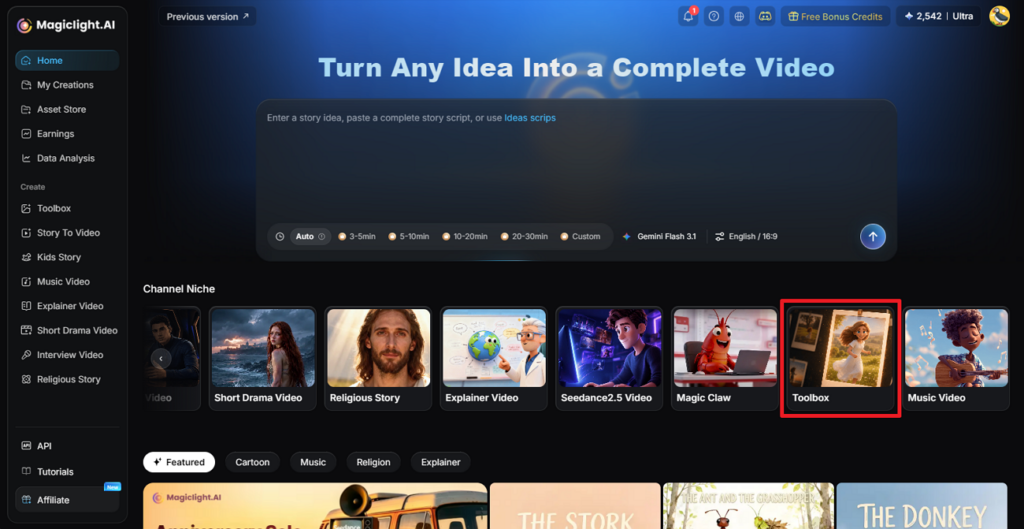
MagicLight AI is an AI-powered video creation platform that helps users turn ideas and scripts into animated videos. MagicLight combines AI-powered storytelling, end-to-end video production, consistent character design, and long-form video creation in a unified workflow.
Key features
- Long-Form Video Generation: MagicLight supports long-form video creation of up to 50 minutes, making it suitable for storytelling, educational content, explainer videos, and other projects that require extended narratives.
- Complete Production Pipeline: Creators can turn ideas and scripts into finished videos through an integrated workflow that combines story development, scene generation, voiceovers, and visual production.
- Consistent Characters Across Scenes: AI-powered character consistency helps maintain a recognizable appearance across multiple scenes, supporting more cohesive storytelling.
- Built-in AI Storytelling: Transform concepts, scripts, and stories into structured video narratives with connected scenes and AI-generated visuals.
2. Blender
Blender is a free, open-source 3D creation suite offering modeling, rigging, animation, rendering, and video editing. Its extensive capabilities make it suitable for ambitious projects, although beginners may need time to learn its interface.
Key features:
- Users can draw 2D sketches directly in a 3D environment, blending traditional animation with 3D.
- The software allows realistic simulations for elements like fluids, cloth, and particles.
- Extensions and plugins can be added to improve workflow and automate repetitive tasks.
3. Pencil2D
Pencil2D is a lightweight, open-source application for hand-drawn 2D animation. Its straightforward interface makes it a practical starting point for learning frame-by-frame animation.
Key features:
- Beginners can switch between bitmap and vector layers for flexible drawing and editing.
- Frame progression can be tracked with transparent overlays to create smooth motion between frames.
- Finished animations can be exported in multiple formats, including GIF.
4. FlipaClip
FlipaClip is a beginner-friendly animation app designed primarily for mobile devices. Users can draw individual frames, add audio, and create short cartoon animations without a complicated desktop workflow.
Key features:
- Pressure-sensitive input ensures fine control when drawing with a stylus or finger.
- Timeline tools make it simple to manage frames and layers for clean animation sequences.
- Templates and prebuilt animation scenes help users start projects quickly and efficiently.
5. Krita
Krita is a free digital painting application with animation features. It suits artists who want to combine illustration and frame-by-frame animation, though it is less focused on complete automated video production.
Key features:
- Custom brushes allow artists to create unique textures and visual effects in their animations.
- A timeline interface makes it easy to arrange frames and manage the animation flow.
- Vector layers can be used alongside bitmap drawings for scalable and editable artwork.
6. OpenToonz
OpenToonz is an open-source 2D animation program with professional production features. It offers substantial creative control but may require more practice than simpler beginner tools.
Key features:
- Hand-drawn sketches can be scanned and seamlessly integrated into digital animation workflows.
- Built-in effects enable lighting, shading, and compositing for professional-looking results.
- Scripting tools allow repetitive tasks to be automated, improving efficiency for complex projects.
7. Synfig Studio
Synfig Studio specializes in 2D vector animation and tweening, which interpolates movement between keyframes. It can reduce repetitive drawing but requires users to understand basic animation principles.
Key features:
- Automatic generation of in-between frames helps save time and reduces manual drawing.
- Characters can be rigged using bones for smoother and more controlled movement.
- Multiple layers can be combined with filters and transformations for dynamic animations.
8. Vyond
Vyond focuses on business animations, training materials, and explainer videos. Its templates and character-based scenes help beginners produce professional-looking presentations efficiently.
Key features:
- Ready-to-use templates accelerate video creation for marketing, educational, or explainer content.
- Characters can be fully customized, including expressions and gestures, to match the story.
- Scene transitions are smooth and help maintain viewer attention throughout the animation.
9. Adobe Animate
Adobe Animate supports 2D animation and interactive content for digital platforms. It is useful for web animations and character projects, although learning its timeline and animation tools takes practice.
Key features:
- Objects can be deformed and animated without redrawing, providing more flexibility in motion.
- Animations can be exported directly to web-friendly formats like HTML5, SVG, and Canvas.
- Multiple layers and symbols allow creators to organize complex scenes efficiently.
10. Procreate Dreams
Procreate Dreams is an iPad animation app designed for drawing, motion, and timeline-based creative workflows. It appeals to illustrators who prefer working with touch and Apple Pencil input.
Key features:
- Touch controls allow intuitive editing of frames and timeline sequences on a tablet.
- Transparent overlays help visualize the sequence of motion for smoother animations.
- Custom brushes enhance the visual style, adding depth and texture to each frame.
Part 2. Side-by-Side Review of the Best Animation Software for Beginners
The best software for beginner animation should simplify the process with intuitive controls, templates, and automation, so new creators can focus on their ideas. Below is a side-by-side review of the top 10 tools to help you make the right choice
|
Software |
Main Focus |
Ease of Use |
Best For |
|
MagicLight AI |
AI animation videos |
Easy |
Automated storytelling |
|
Blender |
3D animation |
Hard |
3D modeling and films |
|
Pencil2D |
2D animation |
Medium |
Hand-drawn animation |
|
FlipaClip |
2D animation |
Medium |
Mobile creators |
|
Krita |
2D drawing and animation |
Hard |
Digital artists |
|
OpenToonz |
2D animation |
Medium |
Traditional animation |
|
Synfig Studio |
2D vector animation |
Medium |
Rigged characters |
|
Vyond |
Business animation |
Medium |
Explainer videos |
|
Adobe Animate |
2D animation |
Medium |
Interactive content |
|
Procreate Dreams |
2D animation |
Medium |
iPad animation |
Conclusion
The best animation software for beginners depends on the type of content you want to create. Blender offers powerful 3D tools, Pencil2D supports traditional drawing, and Vyond simplifies business animation.For creators who want to turn scripts into complete animated videos without manually producing every frame, MagicLight AI offers an integrated alternative with automated storyboarding, character consistency, multiple visual styles, and long-form video generation.
FAQs on the Best Animation Software for Beginners
1. What is the best animation software for beginners to start with?
MagicLight AI is worth considering for AI-generated storytelling videos. Beginners interested in hand-drawn animation may prefer Pencil2D, while Blender suits those ready to learn 3D production.
2. Do I need a powerful PC for animation software as a beginner?
Not always. Lightweight 2D tools can run on modest computers, while complex 3D projects require more processing power. Web-based AI tools can reduce local rendering requirements.
3. How long does it take to learn animation software for beginners?
Basic skills may take days or weeks to develop, while mastering professional workflows can take months or longer. MagicLight AI can shorten the initial learning curve by automating several production steps.
4. How do I choose the best software for beginner animation?
Consider your preferred animation style, budget, hardware, learning time, and project length. Choose a tool that matches your actual production needs.
5. What is the difference between 2D and 3D animation software for beginners?
2D software creates movement using flat illustrations or drawings, while 3D software works with modeled objects and virtual environments. AI video platforms such as MagicLight AI offer another approach by generating animated scenes through an integrated workflow.